Elevate Your Designs with Timeless Peony Flower Line Art
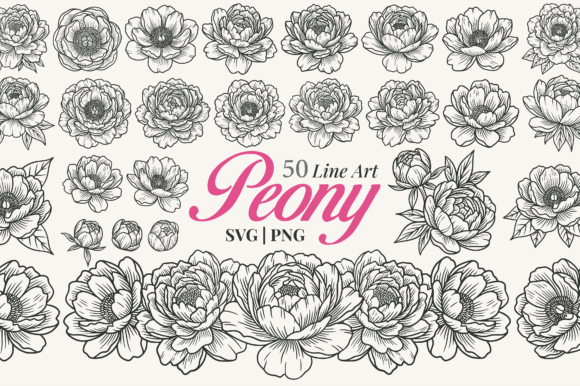
In the vast world of digital design and creative crafting, few elements possess the enduring charm and versatility of floral line art. Among these botanical beauties, the peony stands out as a symbol of romance, prosperity, and elegance. For designers, crafters, and small business owners, finding high-quality resources that balance aesthetic appeal with technical functionality is often the key to success. The 50 Peony Flower Line Art Vector Clipart Bundle offers exactly this balance, providing a comprehensive collection of detailed illustrations that range from fully blooming flowers to delicate buds and intricate arrangements.
This article explores the significance of peony line art, its practical applications in modern creative projects, and why this specific bundle is an essential tool for anyone looking to add a touch of sophistication to their work. Whether you are designing wedding stationery, creating custom apparel, or building a brand identity, understanding how to leverage these assets can transform your creative output.
The Allure of Peony Line Art in Modern Design
Line art has experienced a significant resurgence in contemporary design trends. Unlike watercolor or heavily textured styles, line art relies on clean strokes and negative space to define form. This minimalist approach allows designs to remain legible at various sizes while maintaining a timeless quality. When applied to the peony—a flower known for its lush, layered petals—line art captures the complexity of the bloom without overwhelming the viewer.
The hand-drawn style featured in this collection adds a human touch that digital perfection often lacks. It introduces subtle imperfections and organic flow, making the illustrations feel warm and inviting. This is particularly important in industries like weddings and lifestyle branding, where authenticity and emotional connection are paramount. By using peony line art, creators can evoke a sense of classic beauty that resonates with audiences across different demographics.
Why Peonies? Understanding the Symbolism
Before diving into the technical aspects, it is worth understanding why the peony is such a popular choice for design. Historically, the peony has been associated with honor, wealth, and happy marriages in many cultures, particularly in East Asia. In Western contexts, it is often linked to romance and bashfulness. This rich symbolic history makes the peony a powerful visual shorthand for designers. When you incorporate a peony illustration into a project, you are not just adding a flower; you are imbuing the design with layers of meaning that can enhance the message of your brand or event.
Versatility Across Creative Projects
One of the greatest strengths of the 50-piece Peony Flower Line Art bundle is its adaptability. Because the files are provided in multiple formats, they can be utilized in a wide array of scenarios, from physical crafts to digital marketing materials. Here is how these illustrations fit into various creative workflows:
- Wedding Invitations and Stationery: Weddings are perhaps the most common use case for peony line art. The elegant lines pair beautifully with calligraphy and serif fonts. Designers can use these vectors to create borders, corner accents, or central motifs for invitations, save-the-dates, and thank-you cards. The clean nature of line art ensures that text remains readable even when placed over floral elements.
- Cricut and Silhouette Projects: For makers who use cutting machines like Cricut or Silhouette, vector files are indispensable. The SVG format allows for precise cutting of vinyl, cardstock, or fabric. You can cut out individual peony blooms to layer on scrapbook pages, create window decals, or design custom stickers. The scalability of the vector format means you can cut a tiny bud for a button or a massive bloom for a wall decal without any loss of detail.
- Apparel and Packaging: T-shirts, tote bags, and mugs benefit greatly from simple, bold graphics. Peony line art works exceptionally well for screen printing or heat transfer because the single-color lines translate perfectly onto fabric. Similarly, for small businesses selling candles, soaps, or cosmetics, these illustrations make for sophisticated packaging labels that stand out on crowded shelves.
- Branding and Logo Elements: A logo needs to be memorable and scalable. Incorporating a stylized peony line drawing into a logo can instantly communicate values of growth, beauty, and femininity. Because the files are editable, you can adjust the stroke weight or combine different elements to create a unique mark that represents your brand identity.
- Scrapbooking and DIY Crafts: Hobbyists will find endless uses for these images. They can be printed on paper for journaling, used as stencils for painting, or incorporated into mixed-media collages. The transparent PNG files make it easy to overlay the flowers onto photos or patterned backgrounds in photo editing software.
Technical Excellence: File Formats and Quality
For creatives, the quality of the source file is just as important as the artistic design. This bundle addresses the technical needs of professionals by offering three distinct file types, each serving a specific purpose in the design workflow.
SVG Files: The Power of Scalability
The core of this collection lies in the 50 SVG (Scalable Vector Graphics) files. Unlike raster images, which are made of pixels and can become pixelated when enlarged, SVGs are mathematical descriptions of shapes. This means you can scale a peony illustration up to the size of a billboard or down to the size of a postage stamp without losing any clarity or sharpness. Furthermore, SVG files are editable. Using vector-based software such as Adobe Illustrator, Inkscape, Affinity Designer, or CorelDRAW, you can:
- Change the color of the lines to match your brand palette.
- Adjust the thickness of the strokes for a bolder or finer look.
- Deconstruct the image to isolate specific petals or leaves.
- Combine multiple peony elements to create custom arrangements.
This level of customization is crucial for professional designers who need to tailor assets to specific project requirements.
PNG and JPG Files: Ready-to-Use Solutions
While SVGs offer maximum flexibility, sometimes speed is of the essence. That is where the included 50 PNG files come into play. These images feature transparent backgrounds, allowing you to drag and drop them directly into Canva, Photoshop, or PowerPoint. With a resolution of 300 DPI, they are print-ready for high-quality outputs like brochures or social media graphics. Additionally, the 50 JPG files provide high-resolution versions suitable for web use or digital presentations where a background might be desired.
Common Misunderstandings About Digital Clipart
When browsing for digital assets, beginners often encounter confusion regarding licensing and usage rights. A common misconception is that "free" or low-cost clipart cannot be used for commercial purposes. However, this Peony Flower Line Art bundle is explicitly designed for both personal and commercial projects. This means you can sell items created with these designs, such as printed t-shirts or handmade greeting cards, without needing additional permissions.
Another assumption is that line art is too simple or "childish." On the contrary, line art is a staple of high-end fashion and luxury branding. Its simplicity allows it to convey sophistication. The key is in the execution—high-quality, hand-drawn lines with consistent stroke weights, like those found in this bundle, elevate the design from amateur to professional.
Getting Started with Your New Assets
Integrating this clipart bundle into your workflow is straightforward. Once you have downloaded the files, organize them into folders based on file type. If you are working on a wedding invitation suite, start by opening the SVG files in your preferred vector software. Experiment with combining a large blooming peony with smaller buds to create a balanced composition. Remember, less is often more; let the white space around the lines breathe to maintain that elegant aesthetic.
For those using cutting machines, import the SVG files into Cricut Design Space or Silhouette Studio. Use the "Weld" or "Attach" functions to ensure your design cuts correctly. If you are creating digital content, simply open the PNG files in your layout tool and layer them over your text or background images.
Conclusion: A Foundation for Creativity
The Peony Flower Line Art Clipart Bundle is more than just a collection of images; it is a toolkit for storytelling. Whether you are celebrating a love story through wedding stationery, launching a new product line with elegant packaging, or simply enjoying a weekend of crafting, these illustrations provide the perfect foundation. Their timeless style, combined with the technical versatility of SVG, PNG, and JPG formats, ensures that you have the freedom to create without limitations.
By choosing high-quality, editable vector art, you invest in the longevity and professionalism of your projects. The peony, with its rich history and beautiful form, serves as a reminder that even in a digital age, the natural world continues to inspire our most creative endeavors. Add this bundle to your cart today and unlock a world of possibilities for your next masterpiece. From the first sketch to the final print, let these elegant lines guide your creative journey.